Explore nine multimodal AI content creation tools that help with video, images, and documents, and see where each one fits best in a real workflow.
Introduction
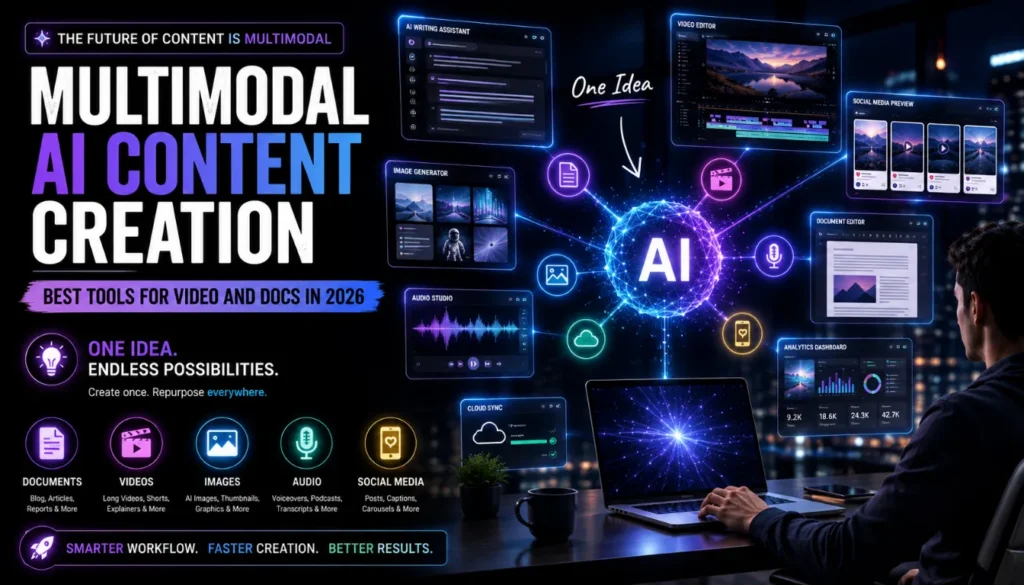
Multimodal AI content creation is changing how creators plan, produce, and repurpose content across blogs, videos, social posts, and documents. Instead of juggling separate tools for writing, design, video, and audio, modern multimodal AI platforms let you combine text, images, audio, video, and files in one unified workflow.
For solo creators and small teams, this shift means faster production without sacrificing quality: one strong idea can now become a long‑form article, explainer video, short‑form clips, carousels, and internal documentation in a single streamlined stack. When used thoughtfully, multimodal AI content creation can support human creativity, making ideation, drafting, editing, and repurposing more efficient while preserving your voice and expertise.
From a 2026 perspective, the best multimodal AI content creation tools are no longer just “text generators.” They combine large language models, vision models, audio tools, and integrations with office suites and creative platforms so you can move seamlessly from research to scripts, from scripts to video, and from video back to documents. As AI‑powered search evolves, especially with features like Google AI Mode, having strong multimodal content—text, video, and docs—helps your work surface more naturally in these new experiences.
In this guide, we’ll break down how Multimodal AI content creation works in practice and how you can pick the best multimodal AI content creation tools in 2026 for your blog, videos, and docs.
What Is Multimodal AI Content Creation?
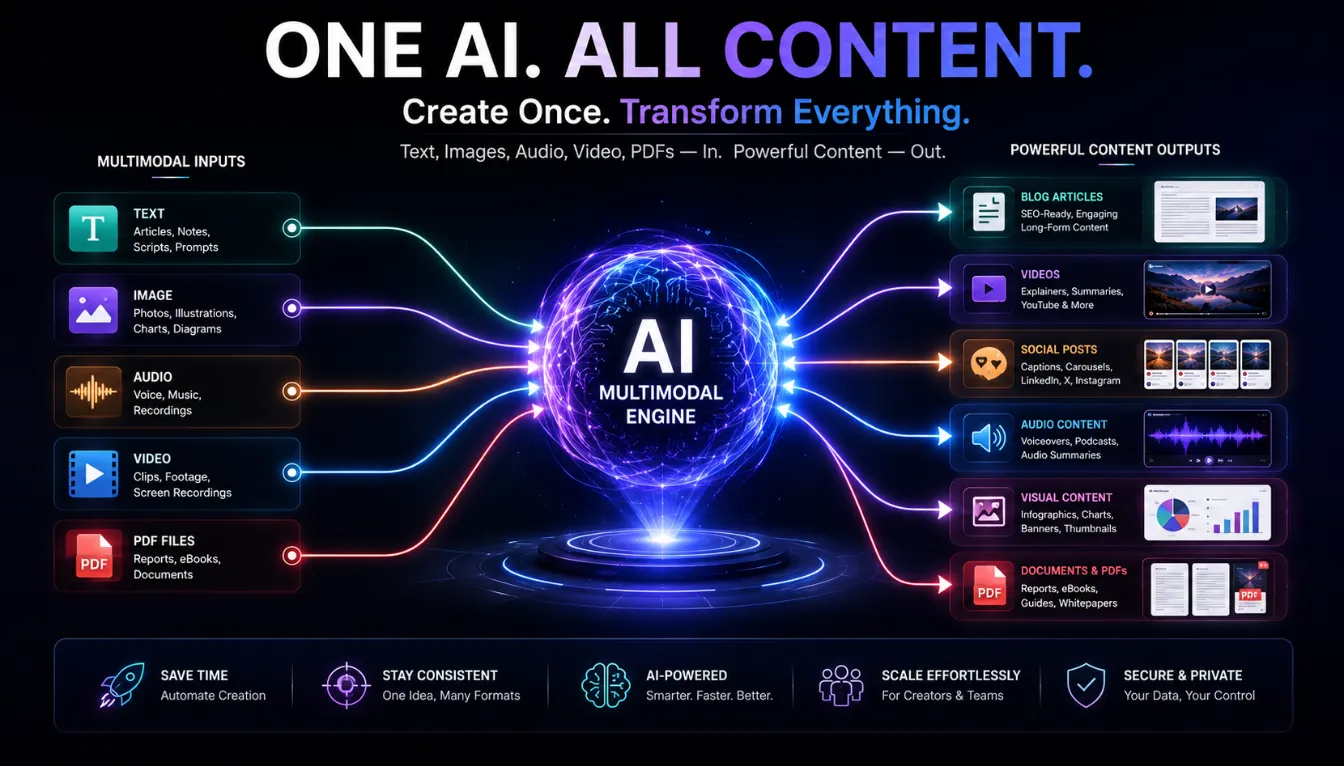
Multimodal AI content creation refers to workflows where AI models and tools can understand and generate across several media types at once: text, images, audio, video, and structured documents such as PDFs or slides. This is different from traditional “text‑only” AI, which can write but cannot interpret visuals or video clips in context.
Real‑time multimodal assistants like ChatGPT, Google Gemini, Claude, and Microsoft Copilot can take mixed inputs—such as a brief, screenshots, a PDF, and a sample video—and return integrated suggestions for scripts, layouts, captions, and even voiceover ideas. Creative platforms such as Runway, Midjourney, Pika, Luma, and ElevenLabs then extend these capabilities into visual and audio production, letting you generate scenes, animations, and voices directly from text prompts, reference images, and existing footage.
For creators, “multimodal AI content creation” really means using a connected tool stack where each piece of content can be planned once and then expressed across multiple formats without manually re‑creating everything from scratch. This is particularly powerful when you’re running a tech blog, YouTube channel, and social feeds at the same time.
When you connect these models into a single stack, multimodal AI content creation becomes a practical way to keep your AI tools for video and docs aligned with your written content and visual assets.
Key concepts at a glance
| Concept | Plain‑language explanation |
|---|---|
| Multimodal model | An AI system that processes text, image, audio and/or video together |
| Multimodal workflow | A content process that moves between formats without changing tools |
| AI tools for video and docs | Platforms that handle both video creation and document‑style text in one place |
Why Multimodal AI Content Creation Matters for Tech Creators
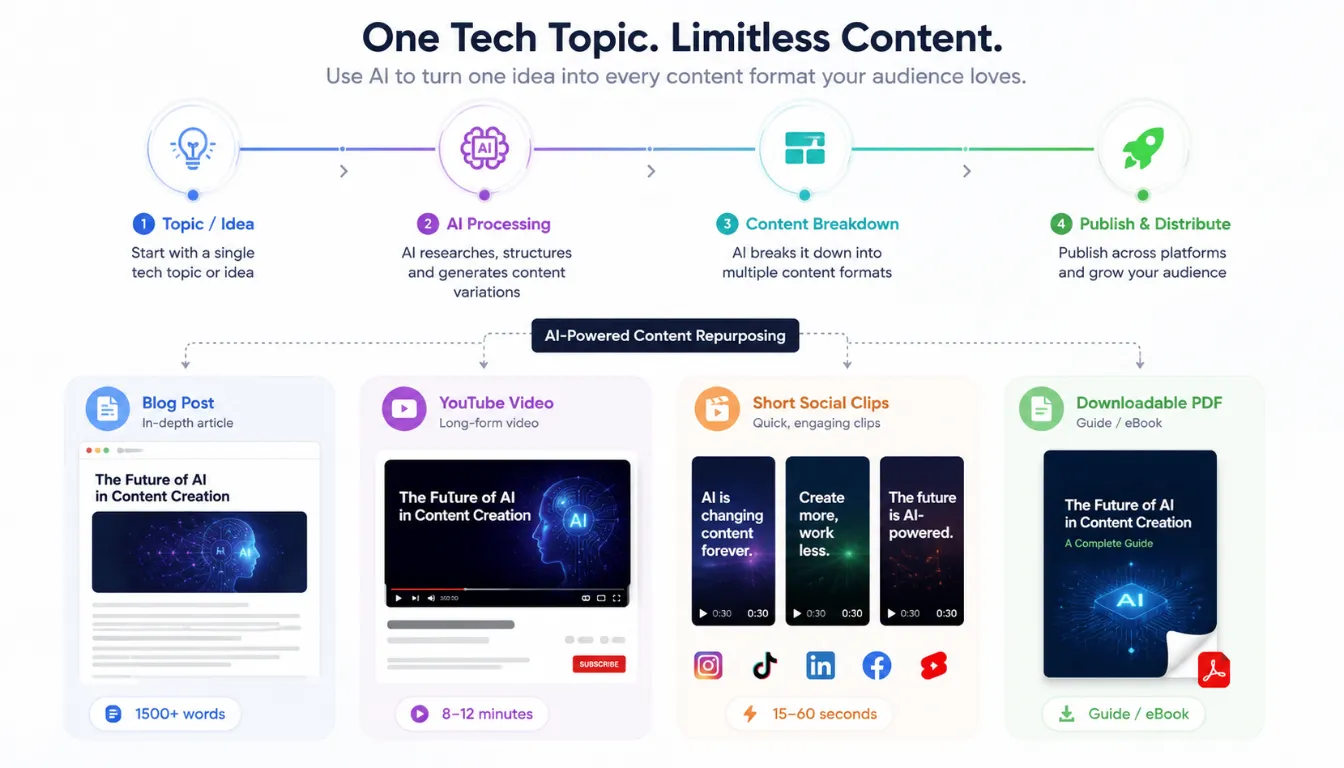
In 2026, most high‑performing content strategies involve multiple formats: long‑form articles, short‑form videos, carousels, email sequences, docs, and internal playbooks. Multimodal AI tools help creators keep up with this demand by turning one strong idea into many assets with less manual rework.
The best multimodal AI content creation tools in 2026 focus on more than just speed—they also help with structure, quality, and consistency. Tools like Claude and ChatGPT excel at long‑form reasoning and editing, making them ideal for strategy documents, detailed tech explainers, and script polishing. Meanwhile, creative platforms like Runway, Sora, Veo, Midjourney, and ElevenLabs handle video scenes, design, and voice, so you can produce cohesive multi‑channel campaigns without a full studio.
For blogs like AI TECH UNBOXED, multimodal AI content creation provides a practical way to turn a deep article into tutorial videos, short reels, visual explainers, and downloadable docs, while still maintaining a people‑first, expertise‑driven tone that aligns with modern search and AI‑search expectations. The same ideas extend beyond software—my roundup of AI smart glasses 2026 shows how wearables and multimodal AI work together to capture and repurpose real‑world moments.
Benefits overview
| Benefit | What it does for your workflow |
|---|---|
| Speed & scale | Ship more posts, videos and docs with less manual effort |
| Consistent messaging | Keep scripts, visuals and documents aligned across channels |
| Easier repurposing | Turn blogs into videos, podcasts into shorts, docs into carousels |
| Better UX for viewers | More polished visuals, audio and captions from the same stack |
For tech creators, this combination of speed, consistency, and repurposing is exactly why multimodal AI content creation has become a core strategy in 2026, especially when you plug in the right AI tools for video and docs.
Key AI Tools for Video and Docs
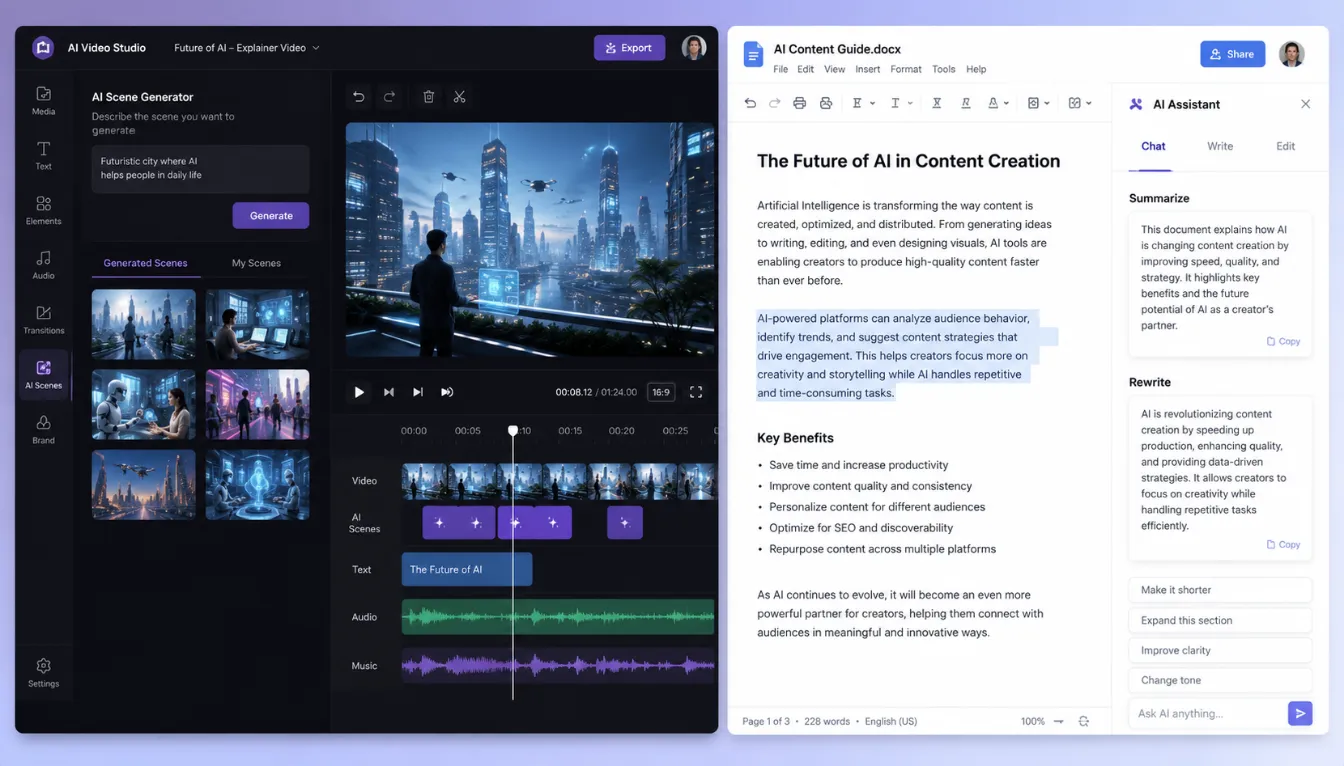
When you focus specifically on AI tools for video and docs, you’re talking about two essential layers in a multimodal stack:
- Video creation and editing platforms that can generate or transform footage from text, scripts, or existing recordings.
- Document‑centric assistants that live inside Google Workspace or Microsoft 365 and help draft, summarize, and restructure content directly in docs, slides, and sheets.
On the video side, tools such as Runway (Gen‑3), OpenAI’s Sora, Google Veo, Pika Labs, and HeyGen are frequently cited as top platforms in 2026 for text‑to‑video, cinematic scenes, and avatar‑style explainers. Many of these tools can take your blog post or script and turn it into storyboarded scenes, product demos, or presenter‑led tutorials with AI‑generated voiceovers and captions.
For documents, Gemini for Workspace and Microsoft 365 Copilot embed multimodal AI directly into Google Docs, Sheets, Slides, Gmail, Meet, Word, Excel, PowerPoint, Outlook, and Teams. They help teams draft reports, content outlines, documentation, and meeting notes, then reshape those materials into decks, scripts, or structured data—without leaving the environment where collaboration already happens. Combined with ChatGPT or Claude for deeper reasoning and editing, these document tools form the backbone of multimodal AI content creation for written and internal assets. If you’re just getting started, focusing first on a few reliable AI tools for video and docs gives you a simple, manageable way to experience multimodal AI content creation without rebuilding your entire stack overnight.
Best Multimodal AI Content Creation Tools in 2026
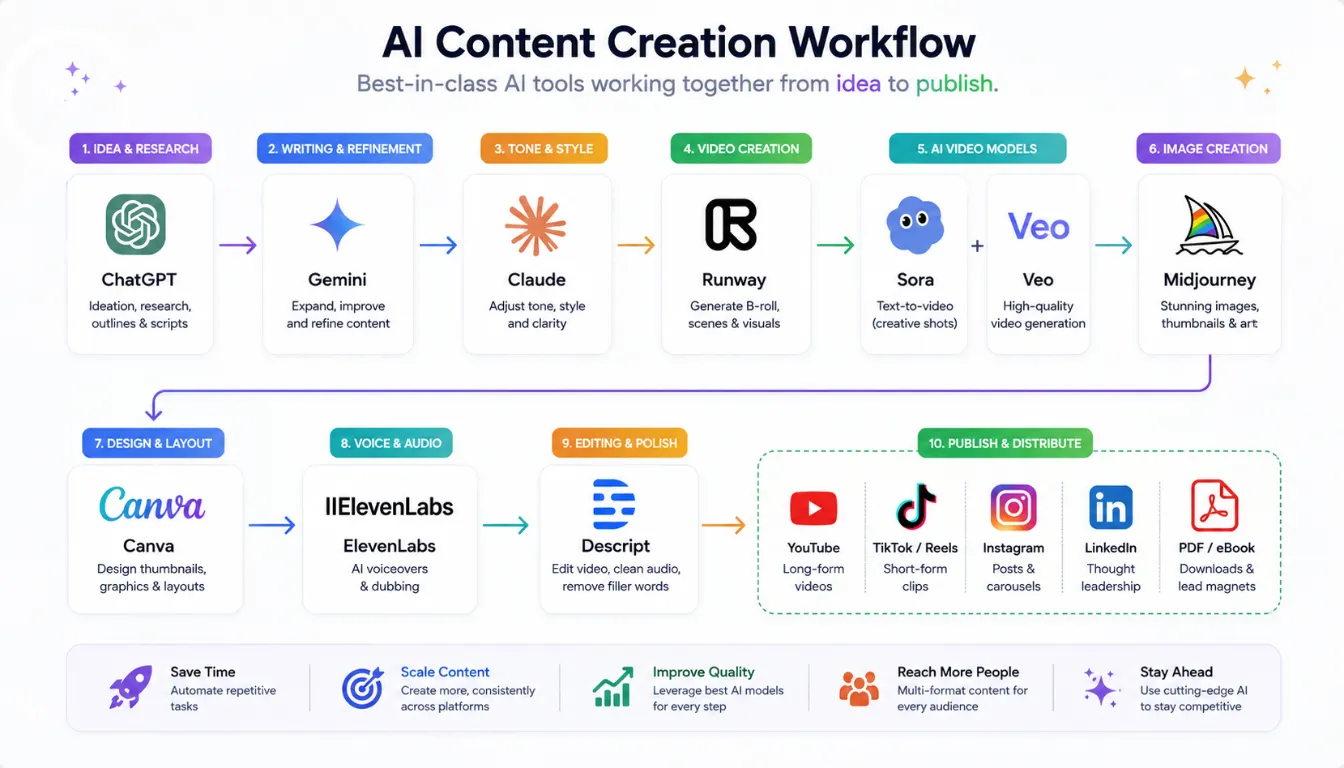
If you’re targeting the long‑tail keyword best multimodal AI content creation tools in 2026, it helps to group tools by their main strengths rather than just listing brand names. Current expert round‑ups and guides highlight several standout categories and platforms.
1. Real‑Time Multimodal Assistants
- ChatGPT (GPT‑4o/next‑gen models) – General‑purpose multimodal intelligence for research, scripting, document review, and conversational workflows.
- Google Gemini – Long‑context multimodal reasoning for research, enterprise workflows, and Google Workspace integration, capable of reading PDFs, screenshots, and images alongside text.
- Claude – Document understanding and long‑form writing engine, especially strong for strategy, detailed tech explanations, and research‑heavy content.
- Microsoft Copilot – Deep integration with business apps, ideal for enterprise productivity and content coordination inside Microsoft 365.
These assistants act as the “brain” of your multimodal stack, helping you generate ideas, outlines, and drafts that later feed into video and design tools. If your main focus is developer workflows, my article on the best LLMs 2025 for coding explains how modern models already support practical coding, debugging, and automation tasks.
2. Video Generation and Remix Tools
- Runway Gen‑3 – Production‑level text‑to‑video and creative video tool, widely used for short‑form clips, motion graphics, and social‑ready visuals.
- OpenAI Sora – High‑end text‑to‑video engine aimed at lifelike, cinematic sequences suitable for marketing and educational content.
- Google Veo – Cinematic video generation from text and images, giving creative and production teams a direct path from concepts to polished video.
- Synthesia & HeyGen – Scalable avatar‑based AI video platforms for explainers, onboarding, and training content where you want a presenter but not necessarily your own on‑camera presence.
These tools are central when your priority is short‑form tech explainers, feature breakdowns, and product demos built from scripts or existing articles.
3. Visual Creation and Design Platforms
- Midjourney V7 – Powerful image generation for storyboards, illustrations, and creative aesthetic exploration.
- Canva Magic Studio / Canva AI – Accessible graphic and social content tool for non‑designers, with AI layout suggestions, image generation, and quick social templates.
- Adobe Firefly / Express – Brand‑aware visual creation and editing, integrated with Adobe’s ecosystem for more controlled design and image workflows.
These platforms give you thumbnails, featured images, infographics, carousels, and simple video assets to support your written and video content.
4. Voice and Audio Tools
- ElevenLabs – Leading AI voice generator with ultra‑realistic voices, multilingual output, and strong lip‑sync accuracy, commonly used for narration and voiceovers.
- Descript – Transcript‑driven editing for podcasts and videos, ideal for cleaning audio, editing via text, and turning long recordings into polished clips.
Audio is a crucial part of multimodal AI content creation: natural voices and clean sound often decide whether a video feels professional or robotic.
5. Workflow‑Oriented Multimodal Tools
- Nano Banana – Ultra‑fast multimodal content generator combining text generation, image creation, research summarization, and SEO/AEO‑ready outline generation for high‑volume teams. If you’re experimenting with high‑volume publishing, my complete guide to Nano Banana AI hacks shows how this multimodal generator can speed up outlines, drafts, and visuals without losing control.
- Sovran – Specialized in turning existing video assets—hooks, bodies, CTAs, demos—into more testable ad variants for performance marketers.
Tools like these focus on the end‑to‑end pipeline: moving from raw ideas and assets to optimized, variant‑rich content for testing and distribution. Together, these assistants, video platforms, design tools, and workflow engines form many of the best multimodal AI content creation tools in 2026, giving you a flexible toolkit for both deep articles and fast video formats. In more advanced setups, AI agents that transform your workflow can sit on top of these tools, handling repetitive tasks and triggering the right multimodal AI actions automatically.
| Tool / Platform | Primary Modes | Best For | Example Use in AI TECH UNBOXED |
|---|---|---|---|
| ChatGPT (GPT‑4o) | Text, images, audio, docs | Research, scripting, analysis | Drafting explainer articles and video scripts from brief notes. |
| Google Gemini | Text, images, audio, PDFs | Multimodal insights, Workspace integration | Summarizing PDFs, screenshots, and docs into article outlines. |
| Claude | Text, docs | Long‑form writing, document understanding | Polishing long tech guides and strategy documents. |
| Microsoft Copilot | Text, docs, slides | Enterprise productivity in Microsoft 365 | Turning meeting notes into slide decks and documentation. |
| Runway Gen‑3 | Video (text‑to‑video, editing) | Short‑form clips, creative video experiments | Converting smartphone camera reviews into motion graphics explainer clips. |
| Sora | Video (text‑to‑video) | Cinematic scenes and branded storytelling | Creating high‑end teaser videos for major AI or smartphone launches. |
| Google Veo | Video (text + images‑to‑video) | Cinematic marketing and product visuals | Generating cinematic demos for AI camera features using text and reference images. |
| Synthesia / HeyGen | Video + avatars | Training, onboarding, explainer videos | Presenter‑style walkthroughs of AI tools without appearing on camera. |
| Midjourney V7 | Images | Artistic images, illustrations, concept art | Creating unique featured images for AI tool reviews. |
| Canva Magic Studio | Images, simple video, layouts | Social posts, thumbnails, carousels | Designing Instagram Reels covers and blog post hero images. |
| ElevenLabs | Audio / voice | Narration and voiceovers | Adding natural‑sounding voiceover to tech explainer videos. |
| Descript | Audio, video + text transcripts | Editing, captions, repurposing recordings | Turning long tech podcasts into captioned short clips. |
Practical Multimodal Workflows for Bloggers and Tech Creators
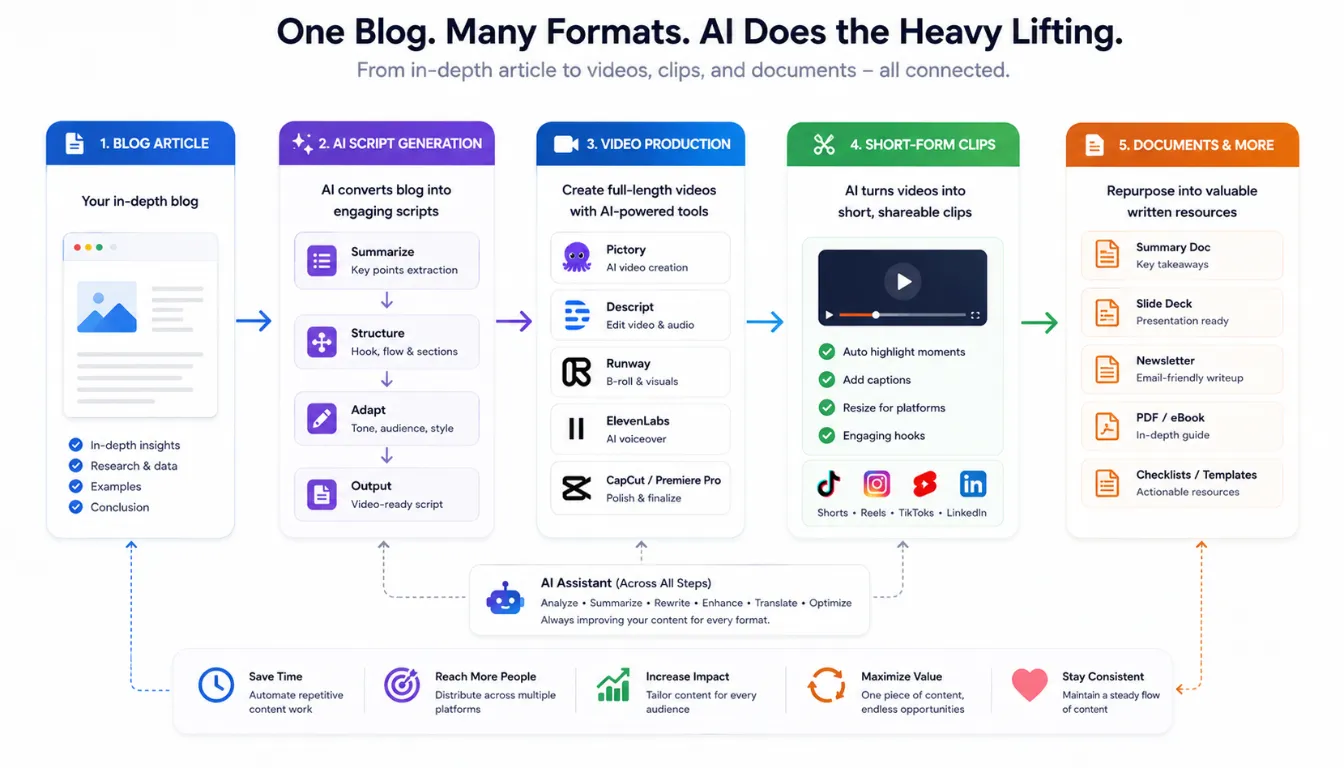
To effectively use multimodal AI for content creation in real-world situations, it is helpful to create repeatable workflows rather than treating each tool as a unique experiment.
A common suggestion in 2026 is to begin with the final output you want—such as a blog, video, document, or short-form content—and then select tools that fit within that process.
Workflow 1: Blog → Explainer Video → Shorts
Research & Outline: Use ChatGPT or Gemini to research a topic (like “multimodal AI content creation for smartphone reviewers”) and create a clear outline.
Article Draft: Use tools such as Claude or ChatGPT to expand the outline into a detailed article with headings and examples.
Review and edit the text manually to ensure it is accurate and conveys the right tone.
Script Extraction: Turn the article into a short and focused video script highlighting a single issue and its solution, such as “How multimodal AI tools simplify smartphone camera content creation.”
Video Generation: Use platforms like Runway, Sora, Veo, Synthesia, or HeyGen to create an explainer video based on the script.
Add custom images or overlays using tools like Midjourney or Canva if needed.
Short-Form Clips: Use tools like Descript or Opus Clip to automatically split the full video into short clips that fit platforms like TikTok, Instagram Reels, and YouTube Shorts.
Include auto-generated captions and adjust the video format to match each platform’s requirements.
Workflow 2: Docs and Internal Assets
Knowledge Capture: Write notes, meeting minutes, and research summaries directly in Google Docs or Word.
AI Structuring: Use Gemini for Workspace or Microsoft Copilot to convert these notes into structured documents such as reports, playbooks, content calendars, or presentation decks.
Review & Polish: Run long documents through Claude or ChatGPT to check for clarity, summarize key points, and ensure the tone matches your brand.
This step helps the content sound natural and professional.
Repurpose Into Public Content: Summarize internal documents into blog posts, newsletters, or public tech explanations.
These pieces should use the structured knowledge from the internal documents but be written for the reader rather than internal teams.
Once you’ve tested these workflows a few times, you’ll have real data on which multimodal AI content creation tools work best for your niche and which AI tools for video and docs actually save you time instead of adding complexity.
You can plug these multimodal AI content creation workflows directly into an existing AI SEO workflow for beginners, so your articles, videos, and docs stay aligned with your keyword and on‑page strategy.
Pros, Risks, and Best Practices
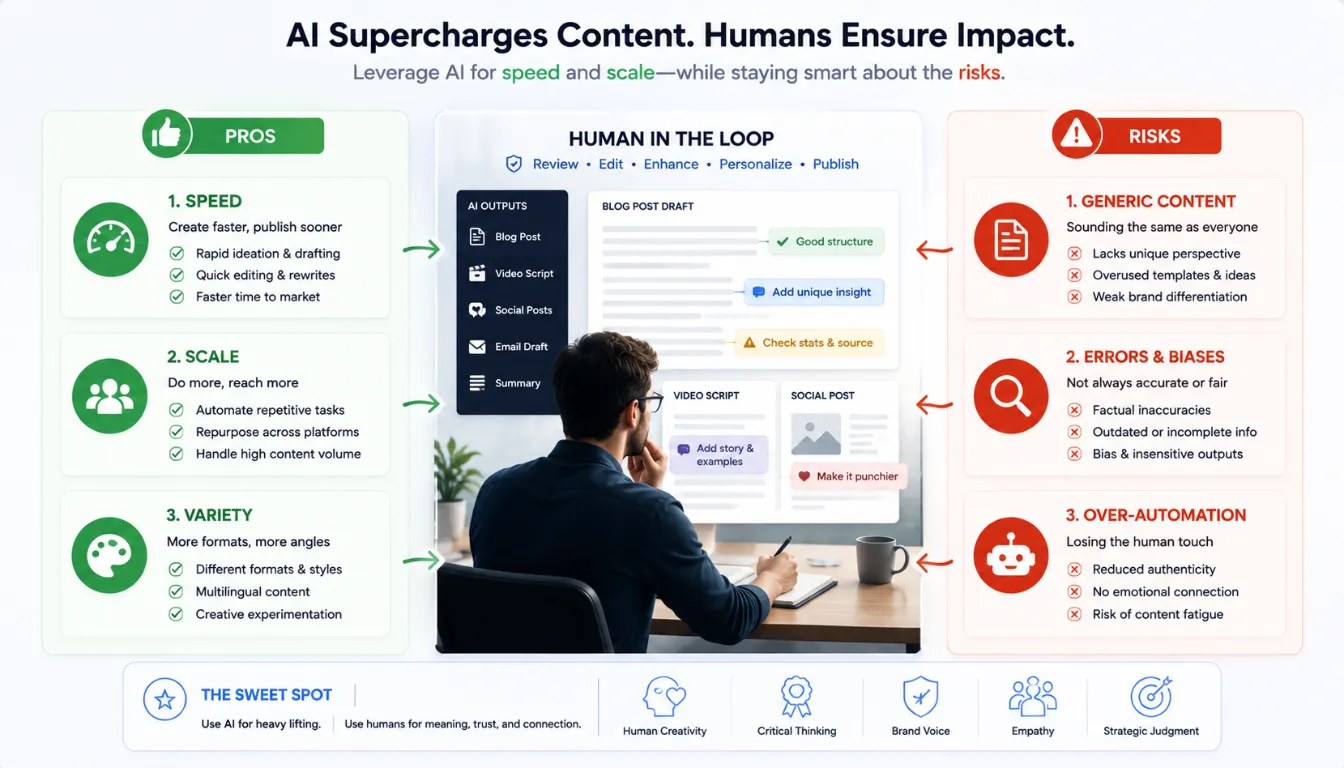
Multimodal AI content creation brings clear advantages: speed, scale, and the ability to publish in more formats without hiring a full production team. However, guides and expert analyses also highlight consistent risks: mediocre or generic content, over‑automation, and quality control gaps if humans are taken out of the review loop.
Best practices in 2026 emphasize separating generation from review. AI can produce drafts, scripts, images, and video variants, but humans should still validate accuracy, check brand fit, and refine messaging before publication. It’s also important to choose tools based on your bottleneck: if ideas are slow, lean on ChatGPT, Claude, or Gemini; if editing is slow, use Descript or CapCut; if variant production is slow, consider Sovran or Runway.
From an SEO and helpful‑content perspective, multimodal AI content creation works best when AI supports a human expert, not replaces them. Readers still respond to lived experience, clear explanations, and honest limitations—even if the drafting and repurposing stages are accelerated by AI tools.
If you want to see how different platforms perform in real campaigns, my breakdown of powerful generative AI tools for content creation walks through real examples and practical impacts.
How to Choose the Right Multimodal AI Tool Stack
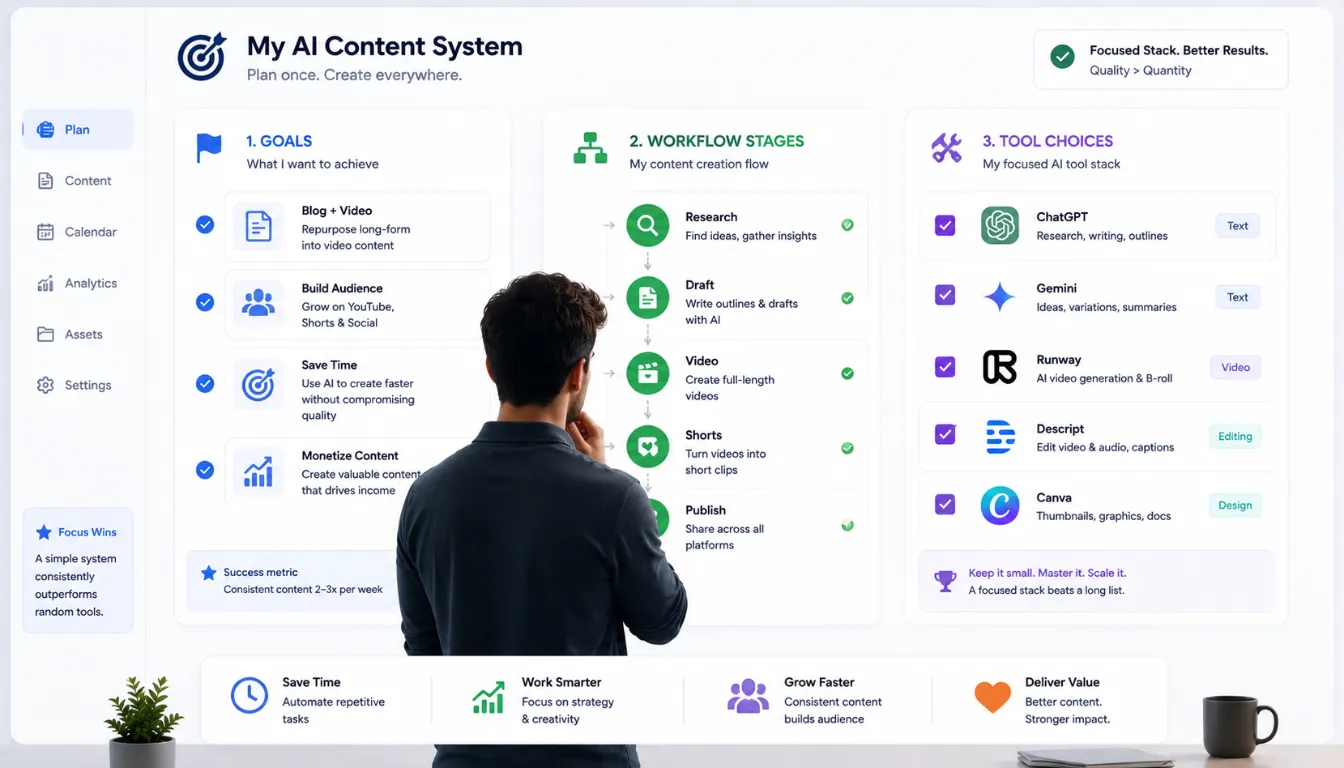
Choosing the right multimodal AI content creation stack starts with your goals: decide whether you care most about long‑form articles, explainer videos, short‑form clips, or internal docs and playbooks. Once your primary outputs are clear, map each stage of your workflow—research, outlining, drafting, visuals, video, editing, and repurposing—and assign one or two tools to each job instead of trying to use everything at once.
It also helps to be honest about your bottlenecks and skill level. If you struggle with ideas and structure, prioritize assistants like ChatGPT, Gemini, or Claude for research, outlining, and rewriting; if editing and captions are slow, lean on Descript, Opus Clip, or similar tools; if visual quality is the issue, focus on Runway, Sora, Veo, Midjourney, Canva, or Adobe Firefly. Start with a small, affordable stack, test it on three to five real projects, and only then add more tools—this keeps your content process simple, predictable, and sustainable instead of turning into “tool overload.”
Finally, pay attention to integrations and ownership. Tools that connect smoothly to Google Workspace, Microsoft 365, your CMS, or your storage will feel more natural in day‑to‑day use than standalone apps with no hooks into your existing system. At the same time, keep human review in the loop for every important output: use AI for speed and variation, but reserve final decisions on accuracy, tone, examples, and publishing for yourself or your team so your content keeps sounding like a real expert, not a generic AI script.
Over time, this selective approach helps you build your own list of the best multimodal AI content creation tools in 2026, tailored to your preferred formats, budgets, and the way you use AI tools for video and docs in your daily workflow.
Who Should Use These Tools (and Who Should Wait)
Use these tools if you: publish regularly across multiple formats (blog, video, social), want to repurpose a single piece of content into several assets, or run a small team where one person handles writing, visuals, and editing. Bloggers, YouTube creators, and indie content marketers will get the most immediate value.
Consider waiting if you: publish fewer than a few pieces per month, are still refining your core topic or niche, or find tool-switching adds more friction than it removes. In that case, one reliable writing assistant is enough to start.
FAQs
Q1. What is multimodal AI content creation in simple terms?
It’s the practice of using AI systems that understand multiple formats—text, images, audio and video—to plan, write, design and edit content across blogs, videos and docs in one connected workflow.
Q2. Do I need all 9 tools to start?
No. Start with a small stack: one writing assistant (ChatGPT or Claude), one visual tool (Canva AI) and one AI tool for video and docs like Pictory or Runway, then expand only if your workload demands it.
Q3. Are these tools safe for monetized channels and brand work?
Most of the best multimodal AI content creation tools in 2026 offer commercial‑use options, but you should always check each tool’s license and terms—some, like Adobe Firefly, put special focus on commercially safe outputs.
Q4. How do I keep my content “human” when using AI?
Use AI for research, structure and drafts, then add your own testing experience, opinions, camera impressions and examples. Aim for personal insights and clear explanations rather than generic summaries.
Q5. Which tools are best if I mainly do short‑form video?
For shorts and Reels, Runway, Pictory, Descript and similar tools are strong options, letting you generate or repurpose clips, add captions and optimize for social platforms quickly.
Q6. Do these tools help with SEO too?
Yes—some platforms help structure articles to match what’s ranking; others simply make it easier to produce consistent, high‑quality content, which indirectly supports SEO and user satisfaction.
Conclusion
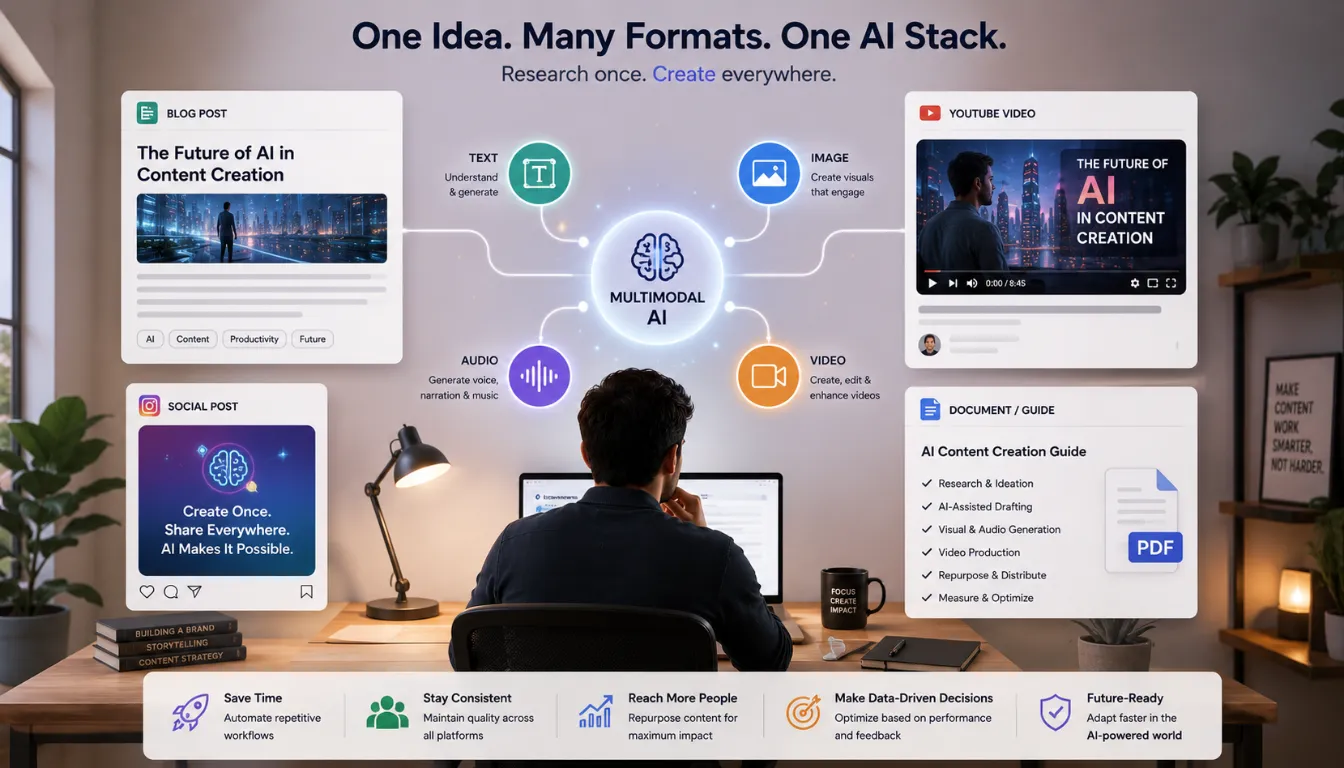
Multimodal AI content creation has moved far beyond early “text‑only” experiments and is now a practical way to run modern content workflows across blogs, videos, social posts, and documents. By combining text, images, audio, and video in a single stack, creators can turn one strong idea into multiple high‑quality assets without constantly switching tools or starting from scratch.
The most effective setups treat AI as a creative co‑pilot rather than an autopilot: AI tools handle research, structure, first drafts, video generation, and repurposing, while humans focus on judgment, voice, real‑world examples, and final approval. When you pair reliable assistants with focused AI tools for video and docs, you get a workflow that is faster and more scalable, but still grounded in human experience and expertise.
Looking ahead, the best multimodal AI content creation tools in 2026 will be the ones that integrate smoothly into everyday work—connecting office suites, creative platforms, and automation systems into coherent pipelines instead of isolated apps. For creators, the opportunity is to build a lean, well‑chosen stack, learn how each tool supports their specific formats, and evolve that stack over time. Used thoughtfully, multimodal AI becomes not just a way to produce more content, but a way to deliver clearer explanations, better visuals, and more consistent stories across every channel.